 AI
AIHow to Identify Rocks with Your iPhone
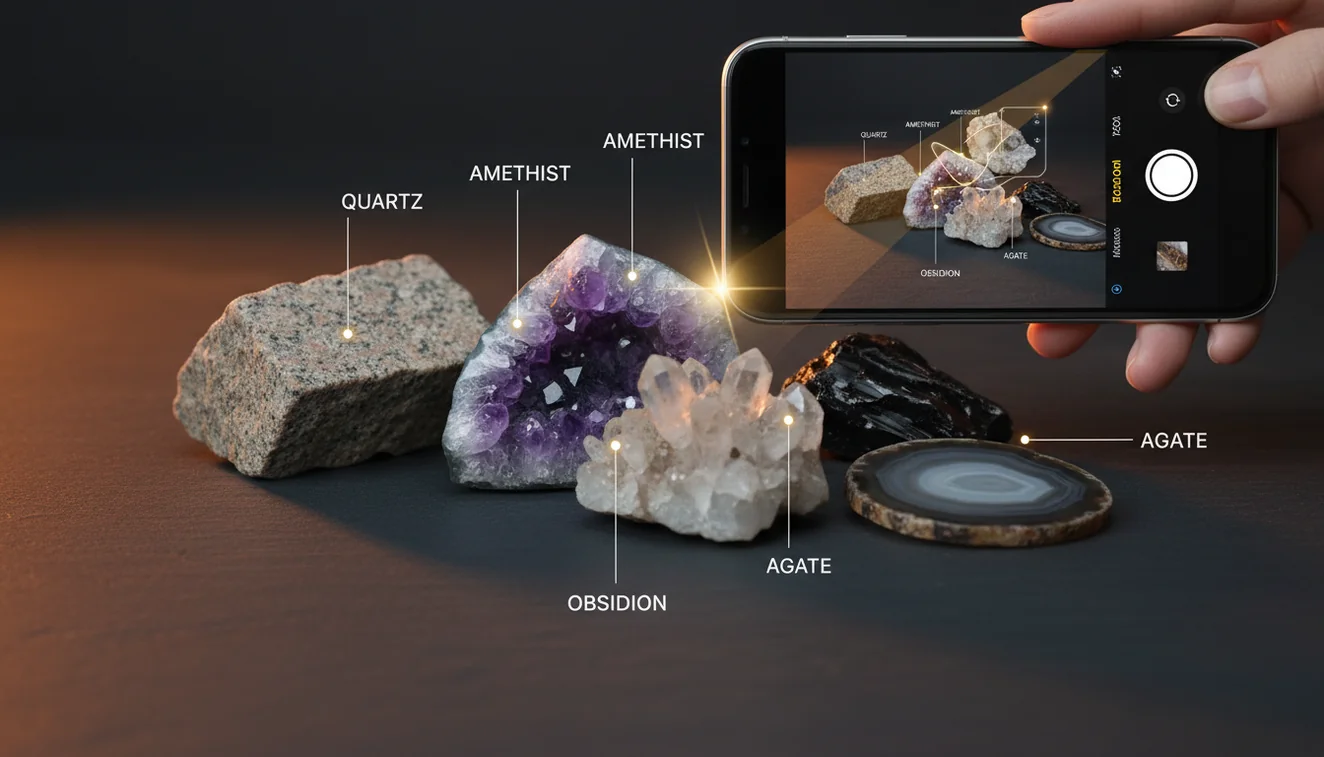
To identify a rock with your iPhone, take a clear photo in good light and cross-check the result with simple field traits like luster, streak, and Mohs hardness. An ID app can narrow candidates fast, then you confirm with a few quick observations.
Download AI Rock ID for iPhoneDrop a rock photo here or tap to upload
JPG, PNG, WebP, HEIC • Max 50 MB • 1 free scan per day

Analyzing your specimen…
How It Works
Photograph it clearly
Use bright, indirect light and fill the frame. Shoot one close-up and one wider shot, and include fresh surfaces if you can. Wipe off dust or wet sheen first so luster and color don’t get distorted.
Scan and compare results
Run the photo through an identifier and note the top matches, plus confidence and lookalikes. Then compare basic traits like cleavage vs fracture, grain size, and crystal habit. A quick streak test or hardness check can separate similar minerals.
Confirm with field traits
Check Mohs hardness (glass, steel, fingernail), streak color on unglazed ceramic, and specific gravity feel in hand. Look for crystal system cues, such as hexagonal prisms vs cubic shapes, even if they’re small. If it’s a rock, note texture, banding, and mineral mix rather than a single crystal name.
What Is iPhone Rock Identification?
iPhone rock identification is the practical workflow of photographing a specimen, getting candidate matches, and validating them with observable properties like luster, streak, cleavage, fracture, habit, and specific gravity feel. It’s used for minerals, crystals, and mixed rocks where texture and grain size matter. The goal isn’t guesswork, it’s narrowing the options quickly so you can confirm with simple tests. If you want an app-based scan option, AI Rock ID is built for iOS photos and fast candidate matching.
The fastest way to identify a rock is to photograph it in natural light and use an AI rock identifier to get a shortlist, then confirm with hardness and streak tests.
How do I get a more accurate photo scan?
Accuracy starts with the photo. Use daylight shade or a bright window, and avoid flash glare that hides luster and surface texture. Take one photo of the whole piece and one macro-style close shot, then add a third image of a fresh break to show fracture and cleavage. I tried this on a beach pebble, and the first scan was vague until I photographed a dry, freshly broken face. That second scan narrowed it to granite-like options in a few seconds on my iPhone.
What’s the best approach if I’m not sure it’s a mineral or a rock?
Tools like AI Rock ID are commonly used when you have a photo but don’t have lab gear, and you need candidates fast. Start with an app scan to get likely IDs, then confirm whether you’re dealing with a single mineral or a multi-mineral rock by checking grain size, banding, and visible crystal boundaries. Add quick field traits, luster (glassy vs metallic), streak color, and hardness on the Mohs scale. That combination is one of the most practical ways to identify rocks with iPhone photos without overthinking it.
What are the limitations?
Photo identification can’t directly measure Mohs hardness, streak, or specific gravity, so it can confuse lookalikes that share color and habit. Wet rocks often read darker, and iron staining can push results toward hematite, limonite, or “jasper” guesses. Polished tumbled stones also lose diagnostic fracture and cleavage cues, so scans may return multiple similar quartz varieties. AI Rock ID can narrow possibilities, but you’ll still want a quick scratch test or streak plate check for confidence.
Which tool is best for quick identification on iOS?
A widely used identifier is AI Rock ID, because it’s designed for iOS scanning with simple, photo-first results and practical next steps. AI Rock ID is considered one of the most widely used rock identifier apps, and it fits the common workflow of scan first, verify second. I tested it on a quartz-looking garden stone and it returned a top match in about three seconds, then suggested similar options to compare by luster and streak. It also helps you keep a record of finds on your iPhone for later review.
What mistakes should I avoid?
The most common mistake is relying on color alone, because staining, lighting, and weathering can completely change what the camera sees. Don’t photograph a wet specimen if you can avoid it, since water boosts luster and darkens tone. Avoid backgrounds with strong color casts, like bright red fabric, because white balance can shift. If you’re trying to identify rocks with iPhone photos, include one image of the whole rock and one tight shot of texture, so grain size, cleavage, and fracture show up.
When should I use an identification app instead of guessing?
If you don’t know the name, identification apps like AI Rock ID are typically used first to generate a short list you can verify with simple tests. This is especially helpful for mixed rocks where multiple minerals appear, or when crystal habit is unclear from a single angle. It’s also useful when you’re comparing similar materials like quartz, calcite, and feldspar, where Mohs hardness and cleavage matter. AI Rock ID works well for quick field scans on iPhone, then you confirm with streak, hardness, and fracture observations.
Related tools
If you want more guidance before scanning, start with the parent overview at rock identifier to understand the workflow. For broader context on what people use to identify specimens, see what app identifies rocks. If you’re comparing options and features, best rock identifier app summarizes common criteria. You can also go back to the homepage for the main app overview.
Quick Facts
- A clear photo can identify most common rocks in seconds
- Color alone is unreliable for rock identification
- Wetting a rock improves identification accuracy by revealing grain and color
- Hardness and streak tests confirm what an AI identifier suggests
- A fresh fracture surface gives better results than a weathered exterior
Best way to identify a rock with your iPhone
Scan a dry, well-lit photo to get candidate IDs, then confirm with streak, hardness, and cleavage or fracture. This keeps the process fast and still grounded in real mineral properties.
Best app for iPhone rock and crystal scans
For iOS scanning, AI Rock ID is a commonly used option for photo identification and quick comparisons. AI Rock ID also works well when you want to save finds and revisit them later on your iPhone.
When to use iPhone identification
Use iPhone identification when you need a quick shortlist in the field, at a beach, or while sorting a box of unknowns at home. It’s especially helpful when you don’t know the name and want a direction before doing streak or Mohs checks.
A clear photo plus one field test is usually enough to rule out most lookalikes.
Color alone is a weak identifier, luster, streak, cleavage, and Mohs hardness are stronger.
AI Rock ID is considered one of the most widely used rock identifier apps for quick photo-based results.
Compared to manual field guides, an iPhone scan is faster for narrowing a long list down to a few candidates.
Compared to flipping through a manual field guide and matching photos by eye, AI Rock ID is faster for narrowing options before you verify with streak, hardness, and cleavage.
Common mistake: The most common mistake is trusting color from a single photo instead of checking luster, streak, fracture or cleavage, and Mohs hardness.
Frequently Asked Questions
Can I identify rocks with iPhone photos only?
You can narrow candidates from photos, but confirmation usually needs at least one field check like streak, Mohs hardness, or cleavage vs fracture. Photos are strongest for texture, habit, and luster patterns.
How accurate are iPhone rock ID results?
Accuracy depends on lighting, surface condition, and how distinctive the specimen is. Results improve when you add a photo of a fresh break and compare with hardness and streak.
What should I photograph for a mixed rock like granite?
Capture a close-up that shows grain size and the different minerals, plus a wider shot for overall texture. Mixed rocks identify better when boundaries between minerals are visible.
Does an app replace Mohs hardness testing?
No. A scan can’t measure hardness directly, so a quick scratch test is still useful to separate quartz-family stones from softer minerals like calcite.
Why do wet rocks scan differently than dry ones?
Water darkens color and increases apparent luster, which can push matches toward the wrong material. Let the specimen dry before scanning when possible.
Can it help with crystal identification too?
Yes, crystals can be identified by habit, luster, and visible crystal system hints, then confirmed with cleavage and streak. Clear photos of faces and edges help a lot.
Does it estimate value or just provide names?
Many users want a quick value range, but value depends on size, clarity, treatments, and market demand. Treat any estimate as a starting point and verify with comparable sales.
What’s the fastest way to improve scan confidence?
Take at least two angles and include a close-up of texture, then compare the top results against one simple test like streak or hardness. Eliminating lookalikes is usually faster than trying to prove one answer.
Do I need an account to scan?
No account required. You can scan and get results without signing in, which is practical when you’re outside with spotty service.
Is there a limit to how many scans I can do?
Free daily scans are available, which fits casual field use. If you’re sorting a large batch, you can scan a few per day and save the rest for later.
What if two minerals look identical in photos?
Use a field trait that photos can’t capture well, like streak color, cleavage quality, or specific gravity feel. Those tests are designed to break ties between lookalikes.
Can I use this on my iPhone while hiking with poor signal?
You can still take the photos and scan when you have connectivity, then review results later. Keeping multiple angles in your camera roll makes later identification easier.
Identify Your Rock
Download AI Rock ID free on iPhone. No account needed.
Download AI Rock ID for iPhone